
Sponsored by

Good morning,
Your AI has plenty of answers. But does it know what your competitors are actually doing?
Without access to their real ads and landing pages, it’s guessing at the market you’re asking it to help you win.
Today, we’re changing that. Radar gives Claude or ChatGPT the evidence: what competitors launched, kept running and switched off, plus the pages behind their ads.
Today: We cover three commerce updates and a holiday social post. In AI Launch Codes: give your AI real competitor data, connect Radar and start with ten questions.
In the Headlines
Shopify adds a ChatGPT checkout setting. Check yours.
Eligible stores using automatic channel management can have agentic checkout enabled by default. Review ChatGPT in Agentic Storefronts; existing opt-outs still apply.
Amazon can turn a holiday wish-list photo into shoppable results.
Its latest Lens feature identifies several items from one list. For brands, it is another reason to make product imagery and descriptions specific enough to match what shoppers actually ask for.
49% of holiday shoppers plan to use AI. Only 6% of AI users buy through it.
NRF’s new breakdown points to research and discovery ahead of checkout. Keep product details and offers clear, and measure the shoppers AI sends to your own site.
On Socials
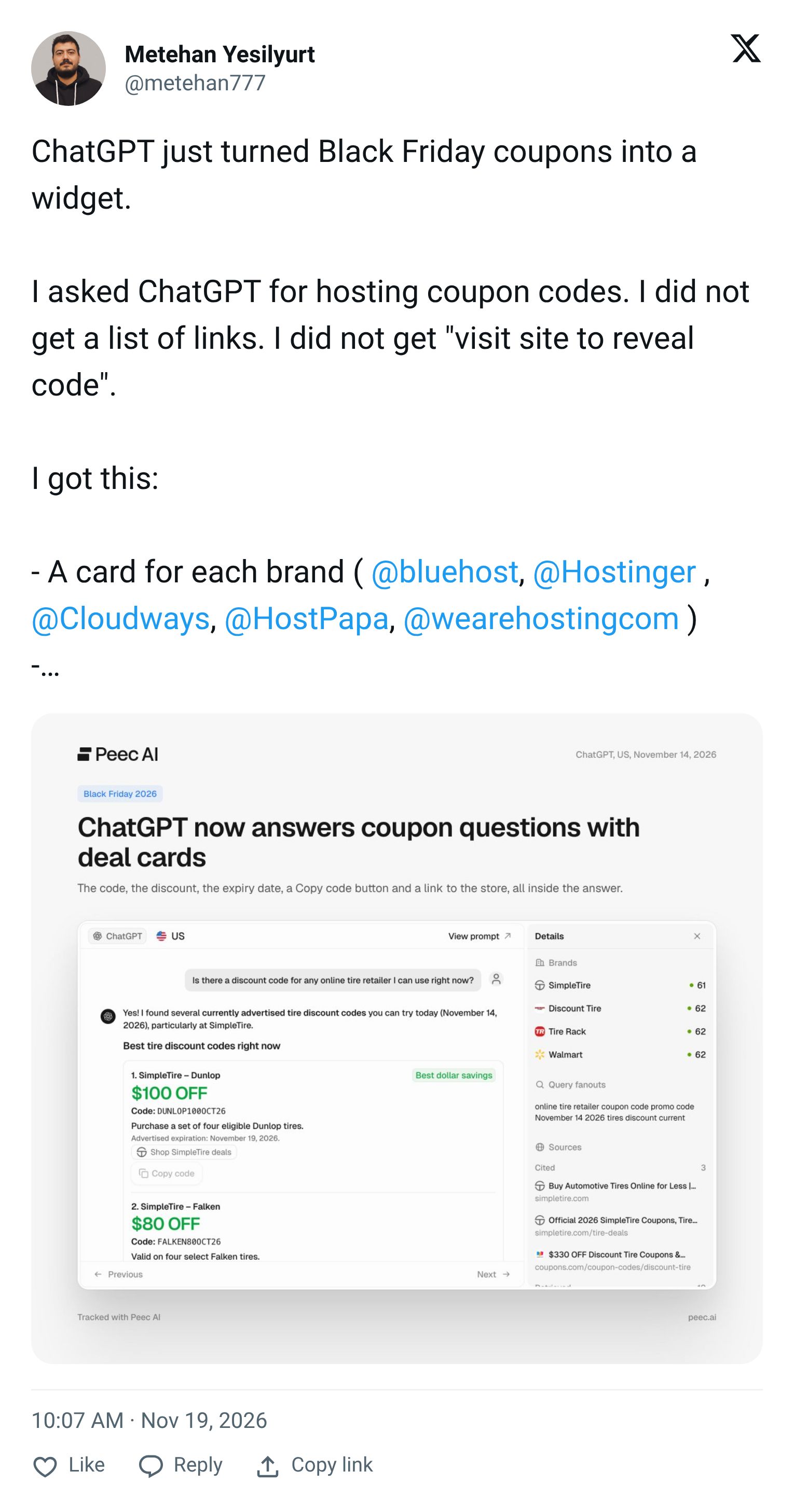
Your coupon code might reach the shopper before your website does.
Metehan Yesilyurt spotted copyable coupon cards in ChatGPT. One observed result does not establish a general rollout. It is a useful reason to check whether your official promotion page clearly states the current code, exclusions and expiry.

Give your AI access to your competitors' Meta ads.
Ask Claude or ChatGPT what ads you should run next.
It will give you an answer. Probably a convincing one.
But unless you’ve connected it to the right data, it doesn’t know what your competitors are running right now. Which ads they’ve kept for months. Which landing pages they’re testing. Or what disappeared last week.
It’s filling those gaps with guesses.
Radar gives your AI something real to work with.
Add Radar to Claude or ChatGPT and name your competitors.
Radar reads their Meta ads and landing pages every night. Your AI can then investigate what they launched, what appears to be scaling and what they stopped.
And it can show you the ads behind its answer.
Take Carpe, the sweat-care brand.
In the example below, Radar examined 605 live ads. “Stops sweat” appeared in 110 of them. It also picked out recurring arguments around odor-causing bacteria and quick-drying lotion.

Animated product demo using a captured Carpe ad snapshot.
You can go further: Show me the strongest example of each angle. What opens the video? What promise does the landing page finish?
It watches what changes. Not just what’s live.
A list of ads is useful. A record of how those ads change is much more useful.
Radar combines ad age with impression rank: the position of an ad in Meta’s impression-ordered list.
An ad that has stayed near the top for weeks tells a different story from one launched yesterday. And a new ad climbing quickly deserves a closer look.
Here’s a captured Grüns example: an ad moved from #90 to #6 in three days.

Captured November 12–15 example. Rank is Meta’s display order, not sales or ROAS.
Alongside that history, you can ask about:
Staying power: how long an ad has been running and whether it keeps a high rank.
Momentum: which ads are climbing or slipping among the ads observed on both checks.
Testing activity: new launches, creative variations and ads that have since switched off.
Messaging: recurring hooks, claims and angles across a brand’s ads.
Landing pages: where each ad sends people, how many live ads point there and what changed on the page.
These are signals of what a competitor is backing, testing or dropping. Radar cannot see their actual spend, sales or ROAS.
And it follows the click.
An ad tells you how a brand gets attention.
The landing page shows how it tries to turn that attention into a purchase.
In the Grüns snapshot, the GLP-1 ads lead to a listicle. Other leading ads point to offer pages. Your AI can study the connection, instead of copying an ad without the argument that comes after it.

Product demo: follow the ad through to its landing page.
Ask about the market, not just one competitor.
This is where it gets interesting.
You can compare the brands you track in the same conversation:
Compare the three competitors I track. Which angles keep appearing in their long-running, highly ranked ads? Which are new tests? Show me the ads and landing pages behind each pattern. Then suggest three tests for my brand and explain the evidence for each.Now you’re looking for patterns across the market.
What several competitors keep returning to. What they’re trying differently. And where there might be room for your own product.

Product demo: a shortlist of tests, with the supporting ads.
Every week, you have an evidence-backed shortlist of ads and landing pages to test next.
Already an AI Launch Codes subscriber? You already have access.
Radar is included in your membership. There’s nothing extra to buy.
Sign in with the email you use for your paid DTC Daily subscription. You can track 3 brands in depth, with 600 AI requests a month, and access the full Funnel Library.
Not subscribed yet? Upgrade to AI Launch Codes to get Radar, the Funnel Library and our practical AI workflows.
Here’s how to connect it.
Connect Radar in four steps
Step 1. Add Radar to Claude
Open Claude. Go to Customize → Connectors, press + Add, then Add custom connector.
Name it Radar. In the address box, paste:
https://radar.dtcdailynews.com/mcpKeep the detected sign-in settings and press Add. If you see Custom → Web instead of “Add custom connector,” use that option and enter the same name and address.
On ChatGPT: open Settings → Apps & Connectors → Advanced settings, turn on Developer mode, press Create, paste the same address and choose OAuth. Custom connectors depend on your ChatGPT plan, so if you don't see the option, use Claude. A free Claude account can add one connector.
Step 2. Sign in
Press Connect. A DTC Daily page opens. Type the email you get this newsletter on, enter the 6-digit code we send you, and press Allow.
Step 3. Let it set you up
Start a new chat and paste this:
Use Radar to set me up. My store is [your website].Claude reads your site, suggests the brands you compete with and asks which ones to track. Your membership tracks 3 brands in depth. Pick the three you'd most like to see inside.
If a competitor isn't in the library yet, give Claude its Meta Ad Library link and we add it. You can add 3 new brands a month. Each country tracked counts as a separate brand.
Step 4. Ask
These are the 10 questions we'd start with. Swap in your own brands.
What are [brand]'s top ads right now?
What angles is [brand] pushing the most?
What hooks open their top-ranked videos?
What did [brand] launch this week?
What did they try and switch off?
Where does their top ad send people?
What changed on that landing page this month?
Give me a Monday brief on the brands I track.
Which ads and landing pages should I test next?
Write test 1 as a script for my product.
Question 9 is the one to run every Monday. Question 10 is where it pays off: your AI writes the ad from what your competitors keep running, with your product in it.
You can add 3 new brands a month if we aren’t tracking your competitors yet. Your plan also includes 1 brand swap a month; swaps are free until 1 December while you choose your three.
Need more? Pro tracks 10 brands with 3,000 AI requests a month for $47/month. One question can involve more than one request.
If you get stuck, reply to this email. I’ll help you get connected.
Presented by HubSpot
A CRM so smart, it updates itself.

HubSpot's CRM is so smart, it now updates itself. Calls get logged and summarized the moment they end. New leads get researched and a first outreach drafted, automatically. Deals move forward on their own, with next steps flagged before you have to ask.
Even the one repetitive task you've been meaning to fix can now run itself, no code required. Customers using it are already seeing the difference.
This isn't the CRM you have to work hard to figure out. It's the one already working before you log in.